Cracker Barrel
- 4.6
- Rating
- 1.00M
- Installs
- Free
- Price
 Analysis by App-foxy
When I want to check a restaurant option before leaving home, I prefer an app that helps with a practical decision rather than simply showing a polished menu. Cracker Barrel fits that role for me. It is a free Food & Drink app from Cracker Barrel CBOCS, and its main appeal is the connection between browsing, planning a visit, and using the restaurant’s own digital experience in one place. I found it most useful when I already had a Cracker Barrel location in mind and wanted to reduce the small bits of friction that usually come with deciding what to order or how to plan the stop.
The app is available to an Everyone audience and has built a sizeable user base, with more than a million installs and an average rating of 4.6 from roughly twenty thousand ratings. Those figures do not automatically make it perfect, but they do suggest that it serves a familiar need for many diners. After spending time with it, my view is fairly straightforward: it is worth keeping if Cracker Barrel is part of your regular restaurant routine, while occasional visitors may find a browser search or a direct conversation with the restaurant sufficient.
How the app fits into an actual Cracker Barrel visit
The first thing I noticed is that this is not a general restaurant-discovery tool. It is built around one brand, which makes the experience narrower than apps that compare nearby restaurants, collect menus from many chains, or combine reservations and delivery in one interface. That limitation is also its reason for existing. Instead of making me filter through unrelated businesses, it keeps the attention on Cracker Barrel’s food, locations, and customer experience.
You May Also Like

 Blood Strike: 2.5 Anniversary
Blood Strike’s Loadouts Turn Every Drop Into a Tactical Gamble
A close look at Blood Strike’s custom loadouts: how fast access to signature weapons reshapes its battle royale rhythm, rewards preparation, and narrows the gap between fights.

 Pandora - Music & Podcasts
Pandora’s Music Is Easy to Start, but Harder to Recover
Pandora’s strength is its low-effort path from a seed to a station. Its weak spot is how much confidence it asks you to place in connection, setup, and quiet recovery.

 8 Ball Pool
 Is Built on Rivalries, Rematches, and Routine
A close look at the rivalries, rematches, shared routines, and unanswered safety questions that turn a quick pool match into a persistent mobile community.

 Samsung Music
’s Quiet Strength Is Playing What You Already Own
Its reach comes less from spectacle than from dependable access to a personal library. That simplicity is both the app’s strongest retention engine and its ceiling.

 AccuWeather: Weather Radar
AccuWeather Review: A Quick, Clear Forecast for Everyday Decisions
For everyday plans, the best forecast is the one you can understand quickly. AccuWeather makes rain timing, radar, and local conditions easy to act on, with a few trade-offs.

 Hill Climb Racing
Why Hill Climb Racing Still Turns Crashes Into One More Run
A tiny car, a bumpy hill and one more upgrade: Hill Climb Racing keeps resurfacing because its simple chaos makes every near-miss feel personal.
More From Our News Desk



I see the app as most useful across three stages: deciding whether the restaurant suits the occasion, preparing before leaving, and handling the visit with fewer interruptions. That can sound modest, but small conveniences matter when I am coordinating a family meal, stopping during a road trip, or trying to choose something quickly before everyone becomes impatient. A dedicated app can also make repeat visits less repetitive because I can use it as a planning tool instead of starting from scratch each time.
One realistic example is a weekend drive with relatives. Before leaving, I can use the app to think through the restaurant stop, look at the available food choices, and make a more informed decision about whether the destination works for the group. If one person wants a substantial meal and another is only interested in a lighter option, checking beforehand is easier than having the entire table decide while hungry. The app does not replace judgment, but it moves that discussion to a calmer moment.
That pre-visit habit is where I think the app delivers more value than its short store description suggests. I would not open it simply to browse restaurants in a new city, because it is not designed as a broad local guide. I would open it when Cracker Barrel is already a serious option and I want brand-specific information in a focused setting.
What the free download really means
The app itself is free, so there is no purchase decision merely to install it or try its basic experience. That makes testing it relatively easy: if I visit Cracker Barrel often, I can see whether the convenience earns a place on my phone without committing money first. The important distinction is that free access to the app is not the same as free food or a free restaurant visit. The app supports the dining experience; it does not turn the meal into a no-cost purchase.
I appreciate that distinction because it keeps the value question realistic. The financial benefit depends on whether the app helps me make better use of visits I was already planning. If I download it expecting every part of the restaurant experience to become cheaper, I may be disappointed. If I treat it as a free planning and engagement tool connected to a restaurant I already use, its value is easier to understand.
The application was released on August 27, 2018, and the current version is 9.1.1.1157. It requires at least iOS 12, which is worth checking before installation if I am using an older Apple device. That requirement is not a problem for many people, but it is a practical gate: a free app is not useful if the phone cannot run it. I also prefer checking compatibility before a trip rather than discovering an issue when I am already on the road.
Where I found the strongest everyday value
For me, the strongest use case is preparation. Restaurant apps often look most impressive when they promise a complete digital journey, but the feature I return to is usually the one that answers a simple question quickly: what should I expect before I arrive? With this app, I can approach a Cracker Barrel visit with a clearer idea of the food and the restaurant experience instead of relying on memory or hurried searches.
A second useful habit is using the app as a group-planning aid. When several people are eating together, the slowest part is often not placing an order but reaching agreement. I can check options ahead of time, share the general choices verbally, and arrive with fewer last-minute debates. This is especially helpful for families, where different appetites and ages can make a spontaneous decision take longer than expected.
A third insight is that a brand-specific app can be more valuable for repeat visitors than for first-time visitors. A regular customer already understands the general style of Cracker Barrel and needs quick access to relevant information. A first-time visitor may still need broader context, such as comparisons with nearby alternatives, independent reviews, or information about restaurants outside the brand. In that situation, I would use this app alongside a map or general search tool rather than treating it as the only source of advice.
I also think the app can help reduce decision fatigue. That sounds minor, but restaurant choices become tiring when I am already traveling, managing children, or coordinating an older family member. Looking beforehand lets me focus on the visit itself. The value is not a dramatic transformation; it is the removal of a few avoidable decisions at an inconvenient time.
The tradeoff between focus and flexibility
The app’s biggest strength and its clearest weakness are the same thing: it is focused entirely on Cracker Barrel. That focus keeps the interface relevant when I want this particular restaurant, but it provides little help when I am comparing several chains or deciding where to eat from scratch. A general food app is better for discovering alternatives, checking multiple menus, or weighing distance and convenience across different businesses.
I would also avoid assuming that a restaurant app can answer every practical question about a visit. Digital information can help me prepare, but it should not replace common sense about changing availability, personal dietary needs, travel conditions, or the preferences of the people joining me. If a detail is important enough to determine whether I can eat there, I would verify it through the most direct current channel rather than relying on an app alone.
Another tradeoff is attention. Every dedicated app takes up storage, screen space, and a little mental space. If I eat at Cracker Barrel once every few years, keeping a single-brand app installed may not be worthwhile. In that case, a temporary search before the visit can be more efficient. The free price removes the financial barrier, but it does not remove the cost of maintaining an app I rarely use.
I would also be cautious about judging the experience solely by its rating. A 4.6 average is encouraging, and the app has around 3.8 thousand written reviews, but ratings describe many different phones, habits, expectations, and restaurant situations. My own standard is more practical: does it help me prepare faster and with less uncertainty? For a regular customer, the answer is likely to be yes more often than for someone who rarely visits.
Who should install it, and who should skip it?
I would recommend trying it to people who visit Cracker Barrel regularly, travel along routes where the restaurant is a familiar stop, or often organize meals for family and friends. It is also a sensible choice for anyone who prefers using an official brand app rather than piecing together information from several unrelated sources. Since the app is free, the decision can be based on usefulness rather than upfront cost.
It is particularly suitable for planners. If I like checking food choices before leaving, coordinating a group, or making a restaurant stop feel more predictable, a dedicated app has a clear role. The benefit grows with repetition: the more often I consider Cracker Barrel, the more worthwhile it becomes to have a single place for that preparation.
I would skip it, at least for now, if I am looking for a general restaurant finder, a comparison service, or a tool centered on businesses from many brands. I would also skip it if Cracker Barrel is not realistically part of my routine. Installing an app for a single unlikely visit can create more clutter than convenience, especially when a normal web search meets the need.
People using older Apple hardware should check the minimum operating-system requirement before trying to install it. The stated minimum is iOS 12, so compatibility matters even though the app costs nothing. That is a small step, but it avoids wasting time and makes the free-access promise more useful in practice.
My verdict after weighing the value
My recommendation is conditional but positive. Cracker Barrel is not a replacement for a broad food-discovery app, and it is not necessary for every occasional diner. Its value comes from being a focused companion for visits to one restaurant brand. I would keep it installed if I were a repeat customer or frequently planned meals for a group, because the preparation benefits would accumulate over time.
The developer, Cracker Barrel CBOCS, has positioned the app around a specific restaurant relationship rather than a wide marketplace. That is the right approach for this kind of product, but it also sets a clear boundary around what I expect from it. I judge it as a brand companion, not as a universal dining assistant. On that basis, the experience makes sense: it gives interested customers a convenient digital starting point without asking them to pay for the app itself.
My final advice is simple. Install it before a planned Cracker Barrel visit, explore whether its tools genuinely save you time, and keep it only if that convenience becomes part of your routine. The best value here is free, practical preparation—not a promise that the app will replace every other food tool. For regular Cracker Barrel diners, that is enough to make it worthwhile. For everyone else, skipping the installation and using a general search option is a perfectly reasonable choice.
What to expect from its current version
The version number gives me a useful point of reference, but it does not tell me by itself what changed between releases. I would not assume that an update introduced a particular feature or that every part of the experience has been redesigned. What matters for someone deciding today is whether the current app supports the way they plan a visit, and I would judge that by trying a real task before relying on it during travel.
For an existing user, the practical approach is to keep the app current through the usual device update process and then check the parts used most often before an important outing. A quick look at food choices or visit details at home is a better test than opening it for the first time in a car park with a group waiting. That small rehearsal can reveal whether the app is convenient on your phone and whether its information answers the questions you actually have.
A useful companion, not the whole plan
If I were deciding whether to install it for a particular trip, I would ask two things: is Cracker Barrel already a likely stop, and will I benefit from checking the choices before we arrive? If both answers are yes, the app has a sensible job. If I am still choosing among several restaurants, I would start with a map or general search, then use the brand’s app only after narrowing the options.
That division of labor is the fairest way to use it. A broad search tool is better for comparing distance and alternatives; this app is better suited to preparing for a visit to this specific restaurant. Keeping those roles separate avoids expecting a single-brand experience to solve a wider dining problem. For me, that makes the app most convincing as a small, optional part of a meal plan rather than something every diner needs on their phone.
FAQs for Cracker Barrel
01What features does the Cracker Barrel app offer?
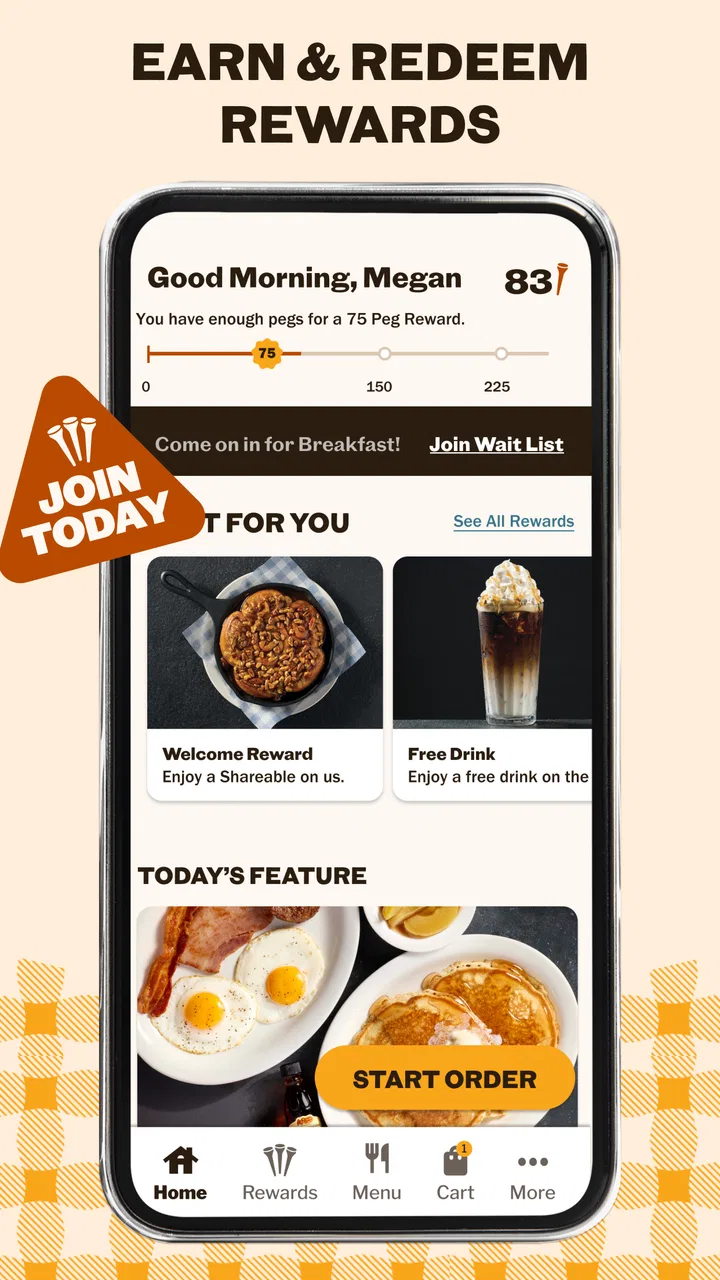
The Cracker Barrel app provides a range of features designed to enhance your dining experience. Users can access the menu, place online orders for pickup, and join the waitlist before arriving at the restaurant. Additionally, the app offers a store locator, special offers, and even a fun game to play while you wait.
02Is the Cracker Barrel app available for both Android and iOS devices?
Yes, the Cracker Barrel app is available for both Android and iOS devices. Users can download it from the Google Play Store for Android devices or the Apple App Store for iOS devices. The app is optimized for both platforms, ensuring a seamless experience regardless of your device choice.
03How does the online ordering process work in the Cracker Barrel app?
The online ordering process is straightforward and user-friendly. After selecting your desired items from the menu, you can customize your order, choose a pickup time, and pay directly through the app. Once your order is confirmed, you’ll receive a notification, and you can pick up your meal at the specified time.
04Are there any special offers or rewards available through the Cracker Barrel app?
Yes, the Cracker Barrel app frequently features special offers and promotions exclusive to app users. These can include discounts, free items, or reward points that can be redeemed for future benefits. Keeping the app updated and checking notifications will ensure you don’t miss any opportunities.
05Does the Cracker Barrel app require any permissions on my device?
The Cracker Barrel app may request permissions to access your location, which helps in finding nearby restaurants and providing accurate wait times. It might also need access to your device's camera for scanning QR codes. Rest assured, the app takes privacy seriously and uses permissions solely to enhance user experience.
Pros
- Authentic Southern recipes delight taste buds.
- User-friendly interface simplifies navigation.
- Regular updates with seasonal menu items.
- Convenient online ordering for quick pickups.
- Loyalty rewards program enhances customer value.
Cons
- Limited customization options for menu items.
- Some features require stable internet connection.
- Occasional app crashes reported by users.
- No delivery option available in all areas.
- In-app promotions can be inconsistent.

Cracker Barrel
Gallery